


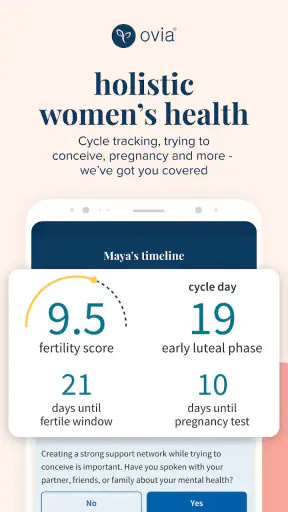

I approached Ovia Cycle & Pregnancy Tracker as someone looking for a calmer way to understand changing reproductive-health information, rather than another app that simply asks me to mark a date on a calendar. It is a free medical app from Ovia Health, intended for everyone, and its broad scope covers periods, ovulation, fertility, menopause, postpartum, pregnancy, and women’s health. That range is useful, but it also means the first few minutes matter: the experience becomes much clearer once I tell it which part of my health journey is relevant right now.
My overall impression is that this is best treated as a personal tracking companion, not as a replacement for a clinician, a diagnostic tool, or a guarantee about fertility. I found its strongest value in organizing observations over time and turning them into something easier to discuss. If I wanted only a very simple period calendar, a narrower alternative might feel quicker. If I wanted one place that could remain relevant through different stages, this app made a stronger case for itself.
What to expect before you begin
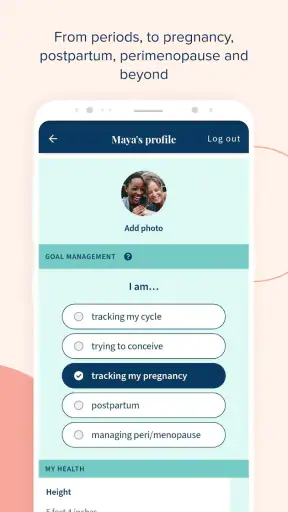
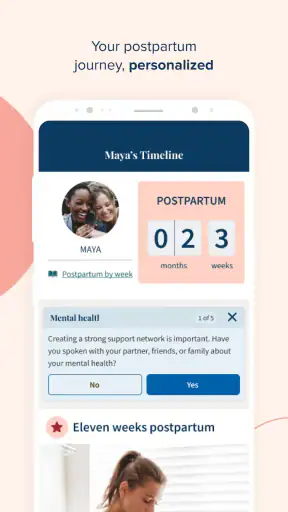
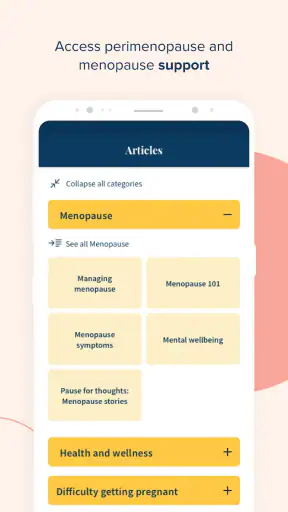
The app’s name emphasizes cycles and pregnancy, but the experience is wider than that. The same product is designed to support people thinking about their period, ovulation, conception, pregnancy, recovery after birth, menopause, or general women’s health. That makes it more adaptable than a single-purpose calendar, although a first-time user may briefly wonder which path to choose.
I recommend deciding what you want from it before entering information. Perhaps you want to recognize your usual cycle pattern, prepare for a conversation with a healthcare professional, understand fertile-window estimates, follow pregnancy-related content, or keep notes during a transition such as postpartum or menopause. Choosing one immediate goal prevents the app from feeling like a large collection of options.
Ovia Health has been developing the app since January 14, 2015, and its current version is 8.8.0. It requires an operating system version of 10 or later. Those details are worth checking before installation, especially if you are using an older phone. The app has passed the point of being an experimental newcomer: it has more than a million installs, an average rating of 4.5, and around 82 thousand ratings. That level of adoption does not prove that it will suit everyone, but it does suggest that the basic concept has found a substantial audience.
The first thing I would not expect is instant personal accuracy. Any tracker needs your input, and early predictions are naturally less useful when the app has little history to work with. I would use the first entries as a starting point, not as a verdict about what my body will do next. A prediction can help me plan; it should not overrule symptoms, a test, or professional advice.
There is also an important emotional consideration. Fertility and pregnancy tracking can be reassuring for one person and stressful for another. If seeing estimated dates makes you check your phone repeatedly or feel pressured by every variation, a simpler notebook or a basic calendar may be kinder. The app is most helpful when it supports awareness without becoming the sole authority over how you feel.
Choosing the right starting point
For a period-focused user, the practical starting point is recording the beginning of the next period rather than trying to reconstruct every detail of the past. For someone planning a pregnancy, the useful starting point is a consistent record of cycle events and relevant observations. For a pregnant user, the focus naturally shifts away from predicting the next period and toward pregnancy-related guidance and tracking. Someone in menopause or postpartum recovery should not force their experience into a regular-cycle model.
This distinction is more important than it sounds. A person with irregular cycles, recent childbirth, hormonal changes, or a changing menopause pattern may see calendar-style estimates that do not match real life. I would treat those estimates as prompts for observation, not as promises. The app can help me notice what is happening; it cannot make an irregular pattern regular.
Setting up the app without overcomplicating it
My advice for the first setup is simple: answer only what you can answer confidently, then return later for anything uncertain. New users often feel they must complete a perfect medical history before the app becomes useful. That is unnecessary for a first meaningful result. A clean, honest starting record is more valuable than a detailed but guessed one.
Begin with the health stage that matches your current situation. If you are tracking a cycle, enter the date you know rather than inventing an exact duration. If you are pregnant, select that context instead of continuing to think in terms of a standard period calendar. If you are postpartum or experiencing menopause-related changes, use the area that reflects that reality. The quality of the guidance depends heavily on using the correct context at the beginning.
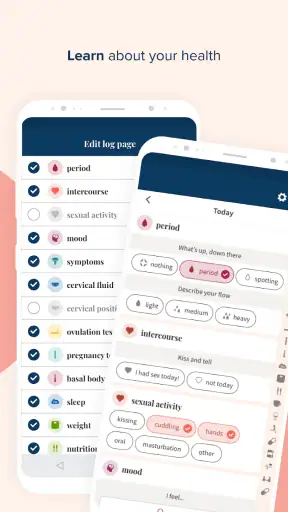
Next, look at the available tracking choices with restraint. It can be tempting to record everything immediately, but I found that a small routine is easier to maintain. Start with the event or symptom that matters most to your goal. After several days, add another observation only if it helps answer a question. This approach reduces the common problem of abandoning a tracker because it feels like a daily paperwork task.
A useful workflow is to make one brief entry at the same moment each day, such as after brushing your teeth or before bed. The exact time is less important than consistency. When I keep the habit attached to something already happening, I am less likely to forget and less likely to fill in a vague batch of memories later. That gives the app a more trustworthy personal record.
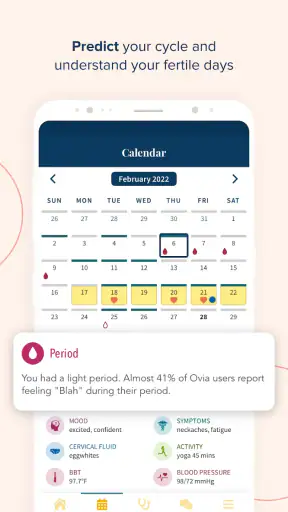
I would also take a moment to read the wording around predictions carefully. An estimated fertile period is not the same as confirmed ovulation, and an expected date is not a medical conclusion. This is one of the most important habits for using any reproductive-health tracker responsibly. The app can organize timing and observations, but it should not be used to diagnose a condition or to make a high-stakes decision without appropriate medical support.
Making the first useful entry
The first successful action is not exploring every screen. It is recording one real event that you can verify. For a cycle user, that might be the start of a period. For a pregnancy user, it might be completing the relevant setup so the app presents information for the correct stage. For someone tracking symptoms, it could be noting one recurring experience in a consistent way.
Once that entry is saved, I would immediately check what changed. Did the calendar or guidance now reflect the selected stage? Is the next suggested action understandable? Can I see where future entries will go? This quick check confirms that I am using the app as intended and prevents me from building a week of records inside the wrong mode.
A particularly useful technique is to connect entries to questions I genuinely want answered. Instead of tracking a symptom because the app offers the option, I might ask whether it appears around a familiar point in my cycle, whether it changes from month to month, or whether it is worth mentioning at an appointment. The app becomes more useful when my records have a purpose.
For a fertility-focused user, I would avoid interpreting a single month too strongly. One cycle can be unusual for many ordinary reasons, and a prediction based on limited history may shift. I would look for patterns across repeated entries and keep room for uncertainty. If timing is important for conception or contraception, I would use additional medically appropriate methods rather than relying on the app alone.
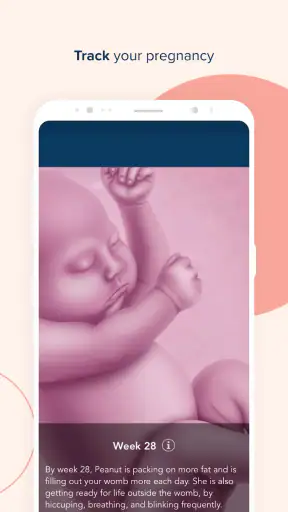
For pregnancy tracking, the first success may be less about a calendar prediction and more about finding information that matches the current stage. I would save or note questions as they occur, then bring important concerns to a qualified professional. A tracker can make a consultation more organized because I can describe timing and changes more clearly, but it should not delay care when something feels urgent.
Where first-time users may get confused
The broad coverage is both a strength and a source of friction. A person arriving for period tracking may see references to fertility, pregnancy, postpartum, menopause, and wider health topics and wonder whether the app is meant for them. My answer is yes, but not every section needs to be part of your routine. Treat the app as a set of pathways and stay in the one that matches your present goal.
Another likely confusion is the difference between a recorded fact and an estimate. A date I enter is my own record. A projected period or fertile window is an interpretation based on the information available. Those two things should not be mentally grouped together. When an estimate changes, that does not necessarily mean the app has lost my history; it may simply be recalculating from new information.
Irregular cycles deserve special caution. If my cycle changes often, if I have recently stopped or started a hormonal method, or if I am postpartum or approaching menopause, a regular calendar model may be a poor fit. The app can still help me document dates and symptoms, but I would place more weight on the record itself than on the predicted schedule.
I would also avoid using the app to explain a concerning symptom by myself. A tracker may help me describe when something happened, how often it appeared, and whether it followed a pattern. That is valuable information for a clinician. It is not the same as identifying the cause. Pain, unusual bleeding, pregnancy concerns, or other symptoms that worry me deserve appropriate medical attention rather than prolonged experimentation with an app.
Privacy is another practical question for any health app. Before entering highly personal information, I would read the app’s current privacy and account choices carefully and decide what I am comfortable recording. I would not assume that a convenient digital journal should contain every detail of my health. A selective record can still be useful, especially when it focuses on information connected to a clear personal goal.
Some users may also expect the app to replace a paper record completely. I would not rely on one system alone for information I need during an appointment. Keeping a short backup note of important dates, symptoms, medications, or questions can be sensible. The app is convenient for ongoing organization, while a separate note can help if I need to communicate quickly or cannot access my usual device.
When another option may suit you better
If I wanted nothing more than a minimal calendar with almost no health content, a basic period tracker could be less distracting. If I needed a clinical monitoring system connected directly to a healthcare provider, I would look for a service designed specifically for that relationship. If I was trying to manage a condition requiring detailed medical measurements, I would choose a tool recommended by my care team rather than expecting this general women’s-health app to cover every need.
On the other hand, many simple alternatives become limiting when life changes. A period-only calendar may not feel relevant during pregnancy, postpartum recovery, or menopause. Ovia Health’s wider focus is the reason I would choose this app over a narrow tracker: I can keep the same general health companion while my questions change. The trade-off is that I need to spend more time choosing the correct context.
Turning the first entry into a useful routine
After the first successful action, I would set a modest next step: return after the next meaningful event rather than trying to interact with the app constantly. For cycle tracking, that means recording the next period when it begins and adding only observations that help me understand my pattern. For pregnancy, it means checking relevant information when I have a question and keeping a separate list of topics for appointments. For postpartum or menopause tracking, it means documenting changes without forcing them into a predictable timetable.
One advanced but practical habit is reviewing the record before a healthcare visit. I would look for dates, recurring symptoms, changes from one cycle to another, and questions that I nearly forgot. This turns the app from a passive calendar into a preparation tool. I would still describe my experience in my own words, because a clinician needs context that a chart or estimate may not capture.
Another useful habit is separating observation from interpretation. I might record that bleeding began on a particular day or that a symptom appeared after a certain event. I would avoid labeling the cause unless a professional has helped me understand it. This makes the record more honest and reduces the risk of treating an app-generated suggestion as a diagnosis.
For users trying to conceive, the most responsible approach is to combine the app’s organization with broader guidance from a healthcare professional. Estimated fertile timing can help with planning, but it should not create false certainty. For users avoiding pregnancy, I would be even more cautious: I would not use a prediction alone as contraception. That is a clear situation where another medically reliable method is necessary.
The app is free, which lowers the barrier to trying it and makes it easier to see whether the broader approach fits my routine. Its Everyone content rating also makes the intended audience broad. Still, “free” does not mean I should install it without considering how much personal information I want to enter or whether I will actually use its tracking tools. The best value comes from consistent, purposeful use rather than from collecting every available detail.
After spending time with it, I see Ovia Cycle & Pregnancy Tracker as a flexible starting point for people who want one women’s-health app to follow changing needs. Its main weakness is the same as its main strength: the wide subject range can feel busy, and predictions can be misunderstood if I forget that they are estimates. A focused setup, a small daily habit, and a clear boundary between tracking and medical advice solve much of that friction.
I would recommend it to a first-time user who wants help organizing cycle, fertility, pregnancy, postpartum, menopause, or related health observations and is willing to build a record gradually. I would skip it if I wanted an ultra-minimal calendar, if tracking increases my anxiety, or if I need a clinical tool for a specific condition. For everyone else, my advice is to begin with one accurate entry, check what the app does with it, and let the usefulness grow from there rather than trying to master the whole product on the first day.


